Mac 圈的周邊大廠 Macally 日前推出了專為 iPod shuffle 與 iPod nano 設計的耳機 mTUNE 與 mTUNE-N ,使用者可將 iPod shuffle 或 iPod nano 插入耳機的一側,就可聆賞裡面的樂曲,讓整組 mTUNE / mTUNE-N 變成專用的「無線」耳機;當然這兩款耳機也可用標準 3.5mm 插頭的音源線來連接其他的音響設備。
不須電池來驅動電力的 mTUNE / mTUNE-N 採用了與先前 Macally 的 Macally NR 耳機、BlueWave 全罩式無線耳機等款式相同的方便收納且防護設計;並設計了巧妙的孔洞,讓 iPod shuffle / iPod nano 的控制按鈕部份顯露出來,讓使用者進行選曲等操作動作。
目前這兩款耳機均尚未公布上市日期;建議售價為 49.99 美元。
iPod的周邊配件實在多的嚇人,而且不管價錢如何,都會吸引客人去購買,尤其像這樣的商品,也很少有人有這樣的創意,把小小的iPod放入耳機,就可以享受音樂,真的是很不錯唷!以一千多元的耳機價格,我想價錢不算是太貴吧,只是音質如何,只能由使用者親自去試聽囉!
文章摘取自老地方冰果室
精選文章
[配件] MOFT Snap iPad保護殼+平板支架
平常我帶 iPad 出門會用兩種不同保護殼做替換 UAG Metropolis for iPad Pro 11" 一個是 UAG 的 Metropolis 保護殼,幾乎全都包,但缺點就是角度比較少,也有點厚重,但保護性相當不錯。 MOFT Float for iPad ...

星期二, 11月 08, 2005


星期一, 11月 07, 2005
【趣聞】BackRow, ugly Windows cousin of FrontRow
Apple才推出新的iMac G5以及搭配的軟體,尤其以FrontRow與Photo Booth較令蘋果迷有新鮮感,Apple 針對家庭電影院市場所做出的嘗試便立即受到了 Mac 使用者以及個人電腦業界觀察家們的矚目。而 Windows 平台上的軟體發展者們在看到了 Apple 的新軟體與其使用界面後,按照慣例在不久後就推出了「100% 忠於原味」的效顰版 Windows 軟體。/backRow 這套軟體雖然在製作人不斷強調只是他用來測試 Windows Presentation Foundation (WPF) 程式開發的一個實驗,但是 Windows 發展者間普遍缺乏原創概念一事也不是什麼驚俗駭世的新消息,而 /backRow 的發表也只是再度的證實了這樣的事實。
另外從技術性觀點上來看,/backRow 設計者也利用了 WPF 的各項功能來逼近 Apple 的 Core Image 技術,雖然成果有點抱歉,但對於他的種種努力也讓人感到佩服。俗話說「寧為雞首,不為牛後」,看來 Windows 發展者的世界觀還是停留於「雞首沒法當、牛後也不賴」的境界。
雖然我覺得FrontRow不算是什麼樣的新技術,只是給人更簡單讓電腦變成多媒體中心的一個整合軟體,也帶給使用者一種全新的使用感受。微軟在這方面,也一直有在努力當中,也推出他的多媒體中心作業平台Window Media Center,使用上來說就沒有像FrontRow那樣有趣味,可見得windows的創意實在有需要在加強一些,別老是想要學別人,把別人的創意當自己的資產。
/backRow設計者網站
TUAW報導
另外從技術性觀點上來看,/backRow 設計者也利用了 WPF 的各項功能來逼近 Apple 的 Core Image 技術,雖然成果有點抱歉,但對於他的種種努力也讓人感到佩服。俗話說「寧為雞首,不為牛後」,看來 Windows 發展者的世界觀還是停留於「雞首沒法當、牛後也不賴」的境界。
雖然我覺得FrontRow不算是什麼樣的新技術,只是給人更簡單讓電腦變成多媒體中心的一個整合軟體,也帶給使用者一種全新的使用感受。微軟在這方面,也一直有在努力當中,也推出他的多媒體中心作業平台Window Media Center,使用上來說就沒有像FrontRow那樣有趣味,可見得windows的創意實在有需要在加強一些,別老是想要學別人,把別人的創意當自己的資產。
/backRow設計者網站
TUAW報導
星期四, 11月 03, 2005
【病毒】IM蠕蟲威脅飆高 60%會關閉防毒軟體
根據資訊安全組織公佈的資料顯示,今年10月所發現的IM安全威脅是去年同期的15倍以上,而且有60%蠕蟲具有關閉防毒軟體的功能。
IMlogic Threat Center是專門偵測全世界IM(Instant messenger,即時傳訊)安全威脅的產業組織。該機構所公佈的最新報告顯示,2005年10月份內偵測到的安全威脅較去年(2004)同期增加1500%以上,而且比2005年9月份增加30%以上。
而且IM蠕蟲也有越來越惡毒的趨勢,10月間所偵測到的有60%具有關閉現有桌上型安全軟體的功能,試圖要破壞防毒軟體的掃毒及防護能力。
10月間IMlogic所偵測到的安全威脅中有87%屬蠕蟲,12%為病毒,只有1%屬用戶端的漏洞。
其中MSN及AOL則是兩大攻擊目標。10月間有66%針對AOL而來,33%針對MSN,Yahoo只有1%。然而,在此之前,2005年裡鎖定MSN的高達62%,AOL為31%,雅虎為7%。
AOL在十月底時剛好爆發W32/Sdbot-ADD木馬攻擊。這也是rootkit首度與IM蠕蟲結合。
IMlogic的報告還顯示出,幾乎所有的攻擊都是利用所謂的「社交工程」(social engineering),比例高達99%。這種方法最常見的,例如以動人的訴求吸引使用者點選IM裡的連結或附件。
IMlogic在新聞稿中呼籲企業,應該採用多層式防護(layered defense)來避免IM安全威脅。IMlogic指出,由於IM網路的即時性以及IM威脅的快速增加,再加上IM惡意程式會關閉防毒功能,因此單靠傳統桌上型電腦防毒軟體以病毒定義檔來偵測與控制病毒的方式,不足以在IM網路上保護企業安全。
IMlogic技術長Jon Sakoda表示,會關閉防毒功能的IM攻擊提醒企業,必需要有更進一步的安全防護。
消息來源
IMlogic Threat Center是專門偵測全世界IM(Instant messenger,即時傳訊)安全威脅的產業組織。該機構所公佈的最新報告顯示,2005年10月份內偵測到的安全威脅較去年(2004)同期增加1500%以上,而且比2005年9月份增加30%以上。
而且IM蠕蟲也有越來越惡毒的趨勢,10月間所偵測到的有60%具有關閉現有桌上型安全軟體的功能,試圖要破壞防毒軟體的掃毒及防護能力。
10月間IMlogic所偵測到的安全威脅中有87%屬蠕蟲,12%為病毒,只有1%屬用戶端的漏洞。
其中MSN及AOL則是兩大攻擊目標。10月間有66%針對AOL而來,33%針對MSN,Yahoo只有1%。然而,在此之前,2005年裡鎖定MSN的高達62%,AOL為31%,雅虎為7%。
AOL在十月底時剛好爆發W32/Sdbot-ADD木馬攻擊。這也是rootkit首度與IM蠕蟲結合。
IMlogic的報告還顯示出,幾乎所有的攻擊都是利用所謂的「社交工程」(social engineering),比例高達99%。這種方法最常見的,例如以動人的訴求吸引使用者點選IM裡的連結或附件。
IMlogic在新聞稿中呼籲企業,應該採用多層式防護(layered defense)來避免IM安全威脅。IMlogic指出,由於IM網路的即時性以及IM威脅的快速增加,再加上IM惡意程式會關閉防毒功能,因此單靠傳統桌上型電腦防毒軟體以病毒定義檔來偵測與控制病毒的方式,不足以在IM網路上保護企業安全。
IMlogic技術長Jon Sakoda表示,會關閉防毒功能的IM攻擊提醒企業,必需要有更進一步的安全防護。
消息來源
【Mac】Airport Update 2005-001
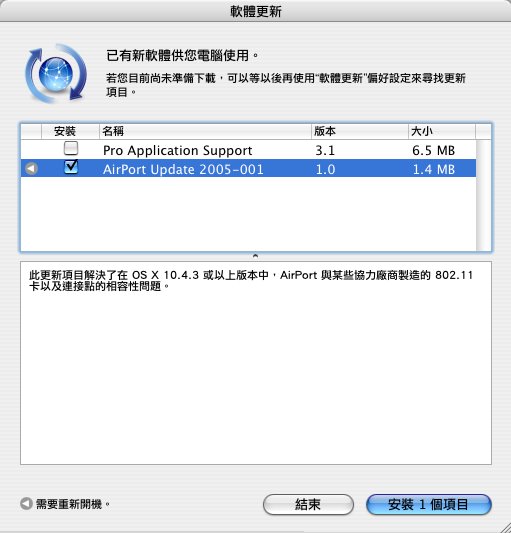
蘋果電腦在網站上貼出了 AirPort Update 2005-001 升級套件。根據說明文件的解說,這次的韌體升級主要是解決了 Airport Express 與 Airport Extreme 對於市面上某些 802.11 無線網卡在 Mac OS X 10.4.3 下的問題,並提高了某些廠牌之基地台與 Airport 系列產品在對連時的相容性。
目前使用者可以透過系統軟體升級功能,或者是直接前往蘋果技術支援網站去下載這個升級套件回來進行安裝。
星期三, 11月 02, 2005
【Mac】Mac OS X 10.4.3 Update
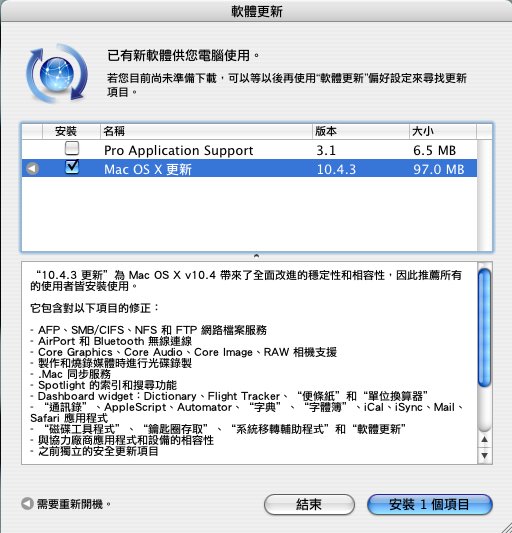
About the Mac OS X 10.4.3 Update (Delta)
The Mac OS X 10.4.3 Update (Delta) updates Mac OS X 10.4.2 to version 10.4.3. (If you are updating from Mac OS X 10.4 or 10.4.1 to 10.4.3, see this article instead.)
Important: Please read before installing.
* You may experience unexpected results if you have third-party system software modifications installed, or if you've modified the operating system through other means. (This does not apply to normal application software installation.)
* The installation process should not be interrupted. If a power outage or other interruption occurs during installation, use the standalone installer (see below) from Apple Downloads to update.
* If issues occur during installation—for example, Software Update quits unexpectedly—please see this article.
Installation
You have two ways to update to Mac OS X 10.4.3: Use Software Update or the standalone installer. You only need to use one of these methods to update your computer.
Automatic Software Update
Software Update, located in System Preferences, can automatically download the latest Apple software. (Software Update might have linked you to this article to learn more about the update.)
Software Update notes:
* The update's size may vary from computer to computer when installed using Software Update.
* Because some updates are prerequisites for others, you may need to run Software Update more than once to get all available updates.
Standalone installer
Two versions of the installer (Delta and Combo, described below) are available from Apple Downloads as standalone updates. After you download an update, you can use it to update your computer without being connected to the Internet.
*
The Delta Update installer (described here) updates Mac OS X 10.4.2 to 10.4.3.
* The Combo Update installer (described in this article) updates Mac OS X 10.4, 10.4.1, or 10.4.2 to 10.4.3 .
The standalone installer, particularly the Combo Update, is useful if you have multiple computers to update and only want to download the update once.
Improvements
This update offers many improvements, including:
Finder and Spotlight
* Improves responsiveness during Spotlight searches in the Finder.
* Spotlight comments entered in the Finder are now preserved when using iDisk syncing.
* Get Info windows correctly display non-Roman language versions and copyright strings.
* Improves the alert that appears when replacing an item during a copy when the capitalization of the items' names is the only difference.
* Permissions for items inside packages are now correctly set when applying permission changes to enclosed items in the Finder Info window.
* Items copied into a Drop Box have permissions set correctly.
* Addresses an issue in which Spotlight cannot find a file after using iPhoto to rename it if the filename originally contained an ampersand (&).
* The Spotlight image indexer now uses the "Software" TIFF property to support graphics rendering and image editing applications that use this property.
Safari, Internet, and networking
* Safari can now pass the "Acid2" test.
* Improves compatibility of Safari with many webcams.
* Improves the handling of Hebrew and Arabic text in Safari and Mail.
* Improves compatibility for OpenGL-accelerated Macromedia Shockwave 3D webpage content when using Safari.
* Addresses an issue in which an SMB volume might not mount again after it's unmounted.
* Addresses some issues in which the Finder might not be able to connect to an SMB volume.
* Bluetooth Setup Assistant now lets you toggle the Modem menu extra on or off (you can also use System Preferences).
* Resolves an issue in which Internet Connect wouldn't connect to a dial-up ISP if the account password contained a double-quote (") character.
* Improves compatibility with Squid proxy servers.
Syncing
* With this update, you no longer need to store Address Book contact URLs in the Notes field when syncing with .Mac.
* Mac sync error alerts now provide a better description of the issue (for more details about a .Mac sync error, see the dotmacsync.log file).
* Allows your Address Book contacts that are organized in subgroups to be synced to an iPod using iTunes.
* Addresses an issue in which Mail might prompt you to download items attached to an IMAP email message more than once.
* In the Fonts & Colors preferences in Mail, you can now customize the font used in the list of Mailbox names.
* Smart Mailboxes that use "Entire Message Contains" and another criteria with the "any" qualifier now work as expected.
* Smart Groups of addresses can now be dragged from Address Book to a message's To, Cc, or Bcc field.
* The number of messages in a Smart Mailbox are now displayed in the title bar.
* Pressing Tab while composing a Mail message now inserts a tab character, instead of four spaces.
* Accounts created in Mail after installing this update will avoid an issue in which .Mac mail could not be sent if the Internet Service Provider blocks port 25.
* Reduces the amount of blank lines Mail might insert into a message when forwarding or replying to it.
* Addresses an issue in which some Mail rules could be lost or duplicated after a .Mac sync.
* Addresses in the "To:", "Cc:", "Bcc:" fields, as well as the Accounts pop-up menu, no longer appear in red if the address is in a different lettercase than what is entered in the "Mark addresses not in the domain" field; for example, "Mac@MAC.Com" will no longer be marked in red if the "Mark addresses not in the domain" field contains "mac.com."
* Searches of "All Mailboxes" can now, optionally, include items from Junk and Trash.
* Resolves an issue in which meeting requests sent from Microsoft Outlook to an Exchange account in Mail might not appear.
iChat
* iChat preferences now allow you to display emoticons (such as a smiley face) as text (such as " :-) ") instead of as a graphic.
* Resolves an issue in Activity Monitor in which you might see "iChatAgent (Not Responding)" in red text, even though iChat works just fine.
* Addresses a "No data has been received for the last 10 seconds" alert that could often appear when participating in a video chat in iChat with someone using AIM on a PC.
* .Mac members can enable encrypted chat sessions after installing this update.
* Further addresses potential causes of persistent "insufficient bandwidth" alerts.
Other applications
* Disk Utility can now verify your Mac OS X 10.4 startup volume if it is Mac OS X Extended (Journaled)-formatted.
* Many improvements for Calculator are included, such as: A black triangle icon no longer appears below "Infinity." Calculator now filters out unusable characters when pasting from the Clipboard, certain "rounding error" issues are addressed, and other issues.
* Addresses an issue in which iCal could not publish or subscribe to a secure URL if your password contained a question mark (?).
* Addresses an issue in which Preview might only print the first page of a multipage TIFF document.
* Keychain Access searching is no longer case-sensitive after installing this update.
* This update allows Keychain Access to directly import .pkcs12 files.
* X11 windows no longer stay in the background after selecting the X11 application from the Dock or with Application Switcher.
Other
* Software Update now lets you know when only ignored (hidden) updates are available for installation.
* Addresses an issue in which incoming faxes are saved as "from unknown" PDF files.
* Addresses an issue in which some Traditional Chinese input methods, such as Pinyin, limit the number of candidate characters presented in the candidate window.
* Resolves an issue for Palm Desktop software in which the Command-Q keyboard shortcut would sometimes not quit the application unless it was pressed a second time.
* Improves compatibility with Microsoft IntelliPoint mouse modifier clicking; that is, mouse buttons configured to act as a Control-click or Command-click, for example.
* Improves window scrolling when dragging an item into a window that's viewed as a list, where not all of the list is visible.
* Improves compatibility with Microsoft Word and Excel 2004, addressing an issue in which the application could stop responding for several seconds.
* Addresses an issue in which cases and/or specific user conversion dictionaries could be disabled after upgrading to Tiger.
* Addresses performance issues affecting three AppleScript commands: do shell script, system info, and delay.
* The Core Data framework has been updated to improve relationship management issues, resolve issues with data migration, improve Undo and Redo commands, and improve insertion performance.
* Resolves a potential redraw issue in which an application window's scroll bars could appear in the wrong place.
* Allows Apple Wireless Keyboards to work in single-user mode.
* Addresses an issue in which high ASCII characters in a password could lead to a blue screen at startup, or prevent log in.
* MS-DOS-formatted volumes, including the iPod Shuffle, perform better and consistently mount (become available) in the Finder.
* Improves results when printing to an optional envelope feeder on some printers.
* Disables Quartz 2D Extreme—Quartz 2D Extreme is not a supported feature in Tiger, and re-enabling it may lead to video redraw issues or kernel panics.
* Includes previous standalone security updates.
更新完10.4.3之後,有用Saft的人,記得也要更新8.1.7唷!
Saft
Saft v8.1.7
Improvement: Safari 2.0.2 (416.12) support
Improvement: Rework for less WebKit dependence
Improvement: Updated French localization
星期一, 10月 31, 2005
【網路】國內網頁與Firefox相容度高
策會近日發表Mozilla/Firefox on Windows可應用度測試報告指出,在Windows平台上使用Firefox瀏覽器開啟常用網頁的相容性約已高達九成。
推廣國內自由軟體應用市場,資策會近日執行自由軟體Mozilla/Firefox瀏覽器在Windows作業系統上的可應用度測試,其調查結果指出,Firefox在Windows作業系統下的可用度測試記錄中,有86%的應用功能屬優良,對一般使用者而言可正常操作無礙。
Mozilla/Firefox on Windows可應用度測試報告係資策會委由國內軟體廠商翔威國際執行,針對國內網頁以Firefox之可用度為主要訴求,測試範圍包括整體美感、使用滿意度、易瞭解性、易學習性等非功能性(non-Functional)因素考量,以及如文字、圖像、影音等網頁組件之中英文呈現(layout)、輸出輸入、資料暨網路存取效率、復原(recovery)等基本應用感受。
此一測試報告中所選用之案例,係來自資策會MIC所統計國內最常用之20個網站為測試案例,再搭配兩種微軟Windows作業系統平台,Windows 2000及Windows XP,共得800個測試紀錄以供評估分析。
其中包括政府宣導類網站,如電子化政府入口網站、國家圖書館全球資訊網、經濟部工業局、行政院主計處、台北市政府、行政院;商業應用類網站,如雅虎奇摩、PCHome網路家庭、中華電信Hinet、Google、eBay、聯合新聞網、中時電子報、東森新聞網、台灣銀行、華南銀行;以及其他具代表性網站,如數位學習網路園區、104人力銀行。
該報告中指出,Firefox在Windows作業系統下的可用度測試記錄中,有86%的應用功能屬優良,對一般使用者而言可正常操作無礙,然而仍有許多網頁並未提供可由Firefox顯示之多媒體組件,如聲音、影像以及特殊外掛程式等,如微軟的Active X,因此導致該報告無法針對Firefox在此方面的可應用度進行評估。
翔威國際指出,儘管Firefox所提供的多媒體組件與現行使用者瀏覽網頁之可應用度無關,然卻是該瀏覽器是否可繼續廣為流傳的重要因素之一,該公司則建議大眾化及政府網頁應提供合乎國際標準,如將資料調整為標準的檔案格式,包括HTML標籤、標準的圖案格式JPEG、PNG、GIF,以及標準的多媒體影音格式如MPEG等,並移除僅有特定瀏覽器可呈現的資料格式,以助自由軟體在市場上的正常應用。
此外,對使用者而言,Firefox瀏覽器在學習性、操作性、易懂性以及有效性的應用度均佔極高評價,結果中顯示為良好者,約近九成,而易學習性更達100%。翔威國際表示,測試結果所顯示出的高接受度及易學習性,將有助於推廣Firefox到一般大眾市場的接受度。
測試結果中,Firefox在Windows XP中的整體畫面顯示效果較佳,包括滿意度、學習性以及整體美學等評價都超越其在Windows 2000上的呈現效果。
原文出處
推廣國內自由軟體應用市場,資策會近日執行自由軟體Mozilla/Firefox瀏覽器在Windows作業系統上的可應用度測試,其調查結果指出,Firefox在Windows作業系統下的可用度測試記錄中,有86%的應用功能屬優良,對一般使用者而言可正常操作無礙。
Mozilla/Firefox on Windows可應用度測試報告係資策會委由國內軟體廠商翔威國際執行,針對國內網頁以Firefox之可用度為主要訴求,測試範圍包括整體美感、使用滿意度、易瞭解性、易學習性等非功能性(non-Functional)因素考量,以及如文字、圖像、影音等網頁組件之中英文呈現(layout)、輸出輸入、資料暨網路存取效率、復原(recovery)等基本應用感受。
此一測試報告中所選用之案例,係來自資策會MIC所統計國內最常用之20個網站為測試案例,再搭配兩種微軟Windows作業系統平台,Windows 2000及Windows XP,共得800個測試紀錄以供評估分析。
其中包括政府宣導類網站,如電子化政府入口網站、國家圖書館全球資訊網、經濟部工業局、行政院主計處、台北市政府、行政院;商業應用類網站,如雅虎奇摩、PCHome網路家庭、中華電信Hinet、Google、eBay、聯合新聞網、中時電子報、東森新聞網、台灣銀行、華南銀行;以及其他具代表性網站,如數位學習網路園區、104人力銀行。
該報告中指出,Firefox在Windows作業系統下的可用度測試記錄中,有86%的應用功能屬優良,對一般使用者而言可正常操作無礙,然而仍有許多網頁並未提供可由Firefox顯示之多媒體組件,如聲音、影像以及特殊外掛程式等,如微軟的Active X,因此導致該報告無法針對Firefox在此方面的可應用度進行評估。
翔威國際指出,儘管Firefox所提供的多媒體組件與現行使用者瀏覽網頁之可應用度無關,然卻是該瀏覽器是否可繼續廣為流傳的重要因素之一,該公司則建議大眾化及政府網頁應提供合乎國際標準,如將資料調整為標準的檔案格式,包括HTML標籤、標準的圖案格式JPEG、PNG、GIF,以及標準的多媒體影音格式如MPEG等,並移除僅有特定瀏覽器可呈現的資料格式,以助自由軟體在市場上的正常應用。
此外,對使用者而言,Firefox瀏覽器在學習性、操作性、易懂性以及有效性的應用度均佔極高評價,結果中顯示為良好者,約近九成,而易學習性更達100%。翔威國際表示,測試結果所顯示出的高接受度及易學習性,將有助於推廣Firefox到一般大眾市場的接受度。
測試結果中,Firefox在Windows XP中的整體畫面顯示效果較佳,包括滿意度、學習性以及整體美學等評價都超越其在Windows 2000上的呈現效果。
原文出處
星期五, 10月 28, 2005
【新聞】上網找工作 用Mac較吃虧
想到大公司上班嗎?麥金塔(Macintosh)使用者可能會比較吃虧一點。
這並非企業領域都以Windows電腦為主的緣故,而是因為對許多大型企業而言,Mac使用者根本連應徵的機會都沒有。
以美國運通(American Express)為例,應徵者會看到以下警告字眼:「目前本系統還不支援Mac環境,若您無法在家或上班期間使用PC,請至社區圖書館、網咖、或政府就業協助中心上網。」
這家金融服務大廠跟許多知名大型企業一樣,都使用外部聘僱管理公司BrassRing來管理線上求職應徵資料,但目前BrassRing軟體並不支援Mac瀏覽器。該公司表示不支援Mac是因為客戶並沒有這方面的需求。
「不過,目前已經看到有一些需求了,」BrassRing發言人Doug Jensen表示,「因此12月出爐的BrassRing Enterprise 8將會支援Firefox,Mac用戶就可使用了。」
至於目前,線上求職者還是會碰上一些問題。Target Stores、Sears等大公司都使用BrassRing的軟體處理線上應徵涵。美國運通還有警告字眼,其他諸如Target或Sears連警告都沒有,僅會出現錯誤訊息,或者使用蘋果Safari瀏覽器時,瀏覽器就直接當機。
雖然美國運通有警告,但部分網友表示使用Safari或Mac版IE瀏覽器還是可以線上填寫應徵涵,但有些人則會碰到問題。
Sears、Target與美國運通都沒有立即針對記者詢問做出回應。
一位暱稱Peter的網友表示,他很難相信Fortune 100大公司竟然會讓Mac用戶吃閉門羹。
「是沒錯,我也可以用FexEx/Kinkos寄,但我沒那麼多時間,」Peter表示,「美國運通這種作法對我們這種Mac用戶真是造成莫大障礙。」
Windows-based電腦雖然是商業市場主流,但蘋果市佔率也在穩定提升中。該公司第三季Mac出貨量提高了48%,目前美國市佔率為4.3%(IDC數據),比去年同期上升了一個百分點。
這樣的窘境,我想日後會慢慢改善,因為Mac漸漸在崛起,好用的東西,是不怕比較的,歡迎大家來試試看唷!
這並非企業領域都以Windows電腦為主的緣故,而是因為對許多大型企業而言,Mac使用者根本連應徵的機會都沒有。
以美國運通(American Express)為例,應徵者會看到以下警告字眼:「目前本系統還不支援Mac環境,若您無法在家或上班期間使用PC,請至社區圖書館、網咖、或政府就業協助中心上網。」
這家金融服務大廠跟許多知名大型企業一樣,都使用外部聘僱管理公司BrassRing來管理線上求職應徵資料,但目前BrassRing軟體並不支援Mac瀏覽器。該公司表示不支援Mac是因為客戶並沒有這方面的需求。
「不過,目前已經看到有一些需求了,」BrassRing發言人Doug Jensen表示,「因此12月出爐的BrassRing Enterprise 8將會支援Firefox,Mac用戶就可使用了。」
至於目前,線上求職者還是會碰上一些問題。Target Stores、Sears等大公司都使用BrassRing的軟體處理線上應徵涵。美國運通還有警告字眼,其他諸如Target或Sears連警告都沒有,僅會出現錯誤訊息,或者使用蘋果Safari瀏覽器時,瀏覽器就直接當機。
雖然美國運通有警告,但部分網友表示使用Safari或Mac版IE瀏覽器還是可以線上填寫應徵涵,但有些人則會碰到問題。
Sears、Target與美國運通都沒有立即針對記者詢問做出回應。
一位暱稱Peter的網友表示,他很難相信Fortune 100大公司竟然會讓Mac用戶吃閉門羹。
「是沒錯,我也可以用FexEx/Kinkos寄,但我沒那麼多時間,」Peter表示,「美國運通這種作法對我們這種Mac用戶真是造成莫大障礙。」
Windows-based電腦雖然是商業市場主流,但蘋果市佔率也在穩定提升中。該公司第三季Mac出貨量提高了48%,目前美國市佔率為4.3%(IDC數據),比去年同期上升了一個百分點。
這樣的窘境,我想日後會慢慢改善,因為Mac漸漸在崛起,好用的東西,是不怕比較的,歡迎大家來試試看唷!
訂閱:
文章 (Atom)