【iTune 6.0.5】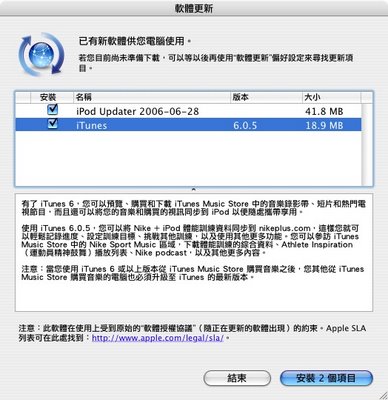
- With iTunes 6, you can preview, buy, and download music videos, short films, and hit TV programs on the iTunes Music Store, and sync your music and purchased videos with iPod to enjoy on the go.
iTunes 6.0.5 allows you to sync your Nike + iPod workout data to nikeplus.com, where you can easily track your progress, set training goals, challenge others, and much more. Visit the Nike Sport Music area on the iTunes Music Store to download workout mixes, Athlete Inspiration playlists, Nike podcasts, and more.
Note: After purchasing music from the iTunes Music Store with iTunes 6 or later, you also need to upgrade your other computers that purchase music from the iTunes Music Store to the latest version of iTunes.
下載位置 19.8MB【iPod Updater 2006-06-28】
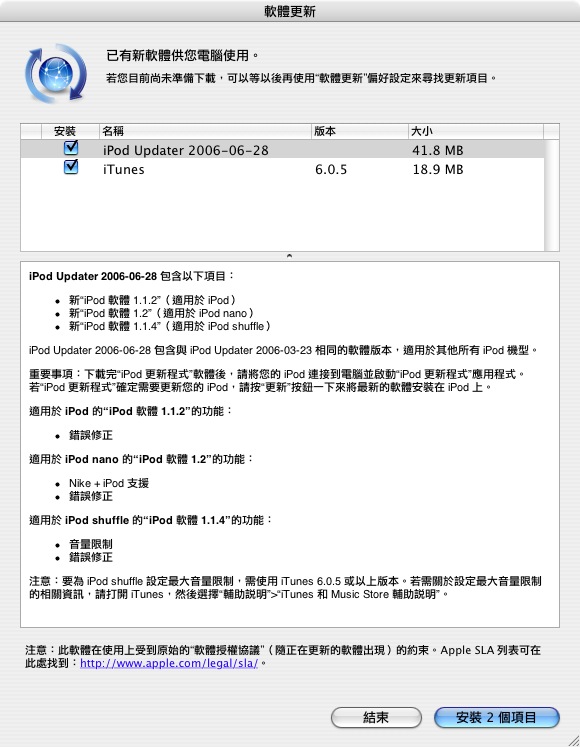
About iPod Updater 2006-06-28
iPod Updater 2006-06-28 includes:
-New iPod Software 1.1.2 for iPod
-New iPod Software 1.2 for iPod nano
-New iPod Software 1.1.4 for iPod shuffle
iPod Updater 2006-06-28 contains the same software versions as iPod Updater 2006-03-23 for all other iPod models.
To learn how to use your iPod with step-by-step instructions and easy-to-follow movies, see the iPod tutorials at http://www.apple.com/support/ipod/howto/.
Click Learn More in each tutorial to see more great tips and instructions.
And be sure to check out iPod 101, our fun, free series of online courses that'll teach you everything about using iPod, iTunes, and the iTunes Music Store.
For more information, visit http://www.apple.com/support/ipod101/.
Note: If you aren't sure which iPod you have, and you want to find out if your iPod needs updating, follow the directions below to use iPod Updater 2006-06-28. If the software on your iPod can be updated, the Update button in the updater application will be available.
iPod Updater 2006-06-28 delivers the following software:
Features of iPod Software 1.1.2 for iPod:
-Bug fixes
Features of iPod Software 1.2 for iPod nano:
-Nike + iPod support
-Bug fixes
Features of iPod Software 1.1.4 for iPod shuffle:
-Volume limit
-Bug fixes
Note: iTunes 6.0.5 or later required to set a maximum volume limit for iPod shuffle. For information about how to set the maximum volume limit, open iTunes and choose Help > iTunes and Music Store Help.
System Requirements
To install and use iPod Software 1.1.2 for iPod, you need:
- An iPod
- A PC with a USB port or card (USB 2.0 recommended)
- Windows 2000 with Service Pack 4 or later, or Windows XP Home or Professional with Service Pack 2 or later
- iTunes 6 or later
- Adobe Photoshop Album 2.0 or Elements 3.0
iTunes is included on the iPod + iTunes CD. To ensure you have the latest version of iTunes, go to http://www.apple.com/itunes/download/.
Note: iTunes versions earlier than 6 are supported for music, photo, and podcast syncing only and will not sync videos properly with iPod.
To install and use iPod Software 1.2 for iPod nano, you need:
An iPod nano
A PC with a USB port or card (USB 2.0 recommended)
Windows 2000 with Service Pack 4 or later, or Windows XP Home or Professional with Service Pack 2 or later
iTunes 4.9 or later
Adobe Photoshop Album 2.0 or Elements 3.0
To install and use iPod Software 1.2.1 for iPod with color display, you need:
-An iPod with color display
-A PC with a high-power USB 2.0 port or card, or a FireWire port or card
- Windows 2000 with Service Pack 4 or later, or Windows XP Home or Professional with Service Pack 2 or later
- iTunes 4.7 or later
- Adobe Photoshop Album 2.0 or Elements 3.0
Note: iTunes versions earlier than 4.9 are supported for music and photo syncing only and will not sync podcasts properly with iPod.
To install and use iPod Software 1.1.4 for iPod shuffle, you need:
- An iPod shuffle
- A PC with a USB port* or card
- Windows 2000 with Service Pack 4 or later, or Windows XP Home or Professional with Service Pack 2 or later
- iTunes 5.0.1 or later
Note: iTunes versions earlier than 4.7.1 are not supported and will not sync music properly with iPod shuffle.
*Some computers require either the optional iPod shuffle dock or a USB cable extender (sold separately).
To install and use iPod Software 1.4.1 for iPod mini and iPod Software 3.1.1 for iPod with Click Wheel, you need:
- An iPod mini or an iPod with Click Wheel
- A PC with a high-power USB 2.0 port or card, or a FireWire port or card
- Windows 2000 with Service Pack 4 or later, or Windows XP Home or Professional with Service Pack 2 or later
- iTunes 4.7 or later
Note: iTunes versions earlier than 4.9 are supported for music syncing only and will not sync podcasts properly with iPod.
To install and use iPod Software 2.3 for iPod with dock connector, you need:
- An iPod with dock connector
- A PC with a high-power USB 2.0 port or card, or a FireWire port or card
- Windows 2000 with Service Pack 4 or later, or Windows XP Home or Professional with Service Pack 2 or later
- iTunes 4.7 or later
To install and use iPod Software 1.5 for iPod with touch wheel or scroll wheel, you need:
An iPod with touch wheel or scroll wheel
A PC with a FireWire port or card
Windows 2000 with Service Pack 4 or later, or Windows XP Home or Professional with Service Pack 2 or later
iTunes 4.7 or later
Using iPod Updater 2006-06-28
To install and open the iPod Updater:
1. Open iPodsetup.exe on the iPod + iTunes CD or from the web download at www.apple.com/ipod.
2. Connect your iPod to your computer. If you are using USB, make sure iPod is connected to a high-power USB port on your computer. Be aware that USB keyboards and non-powered USB hubs generally do not have high-power USB ports.
3. Run iPod Updater 2006-06-28.exe from Start\All Programs\iPod\iPod Updater 2006-06-28.
4. When iPod Updater opens, click Update or Restore.
Choosing Update or Restore
iPod Updater 2006-06-28 has two functions, Update and Restore.
Update: If you choose Update, the software on your iPod is updated with the new version of software. Songs and other data on iPod are not affected. If your iPod already has up-to-date software, the Update choice is not available. Restore: If you choose Restore, the entire contents of iPod are erased, all iPod settings are reset, and new software is installed.
WARNING: Choosing Restore erases all of the music and other data on iPod.
下載位置 49MB