精選文章

[配件] MOFT Snap iPad保護殼+平板支架

平常我帶 iPad 出門會用兩種不同保護殼做替換 UAG Metropolis for iPad Pro 11" 一個是 UAG 的 Metropolis 保護殼,幾乎全都包,但缺點就是角度比較少,也有點厚重,但保護性相當不錯。 MOFT Float for iPad ...

星期四, 6月 29, 2006

【Mac軟體】Adobe Flash Player 9.0 & Yahoo Messenger 3.0beta1

Adobe 正式發表 Flash Player 9

繼前不久開放公開測試後,Adobe 在今天正式發表了 Flash Player 9。這個最新一代的 Flash 播放器除了具有安全性高以及速度提升等特點外,對於 Mac user 來說最重要的改進之處,就是 Adobe 將會在近期發表 Universal Binary 的版本。因此在未來 Intel Mac 的用戶也可以在原生的狀態下播放網路上的 Flash 動畫內容。

現在是使用 PowerMac 以及 Windows 的朋友們可以透過相關連結,前往 Adobe 的網站去下載正式版的 Flash Player 9 安裝程式。

下載位置


Yahoo Messenger 3.0b1

Yahoo! 在今天發表了 3.0 測試版的 Yahoo Messenger 簡訊軟體。新版本的 YM 新增加了跨平台的視訊連線功能、多人語音會議、圖片顯示、Unicode 支援、檔案傳輸、手機簡訊等功能,其使用者界面也完全重新設計,使用 Mac OS X 的標準使用者界面外觀。Yahoo! 並表示在未來他們將會提供與 MSN 用戶傳送簡訊的能力。

您若也是 Yahoo Messenger 的用戶,不妨前往他們的網站去下載這個新版本的軟體回來使用看看。

Version 3.0b1:

* Entirely new user interface written in Cocoa designed specifically for the Mac OS X operating system
* Yahoo! Avatars and Display Images
* Custom stealth settings
* Webcam support, compatible across PCs and Macs
* Custom Status messages, including links to music tracks
* Animated sign-in, sign-out, and contact list
* All new sound effects
* Visual notifications with support for the Growl global notification system
* Alerts for Yahoo! Calendar, Mail and Personals
* Coming soon: In the future, support for interoperability with Windows Live (MSN) Messenger

下載位置


Technorati Tags:

星期三, 6月 28, 2006

【Mac】Mac OS X 10.4.7 & QuickTime 7.1.2 Update

【Mac OS X 10.4.7】


Please Remember repair boot disk permissions before you update to 10.4.7.
Application --> Disk Utility --> choose Hard Disk --> Repair Disk permission
應用程式-->磁碟工具程式-->選取開機硬碟/磁區-->驗證/修復磁碟權限
常常可以避免升級後出狀況


Now available through software update. Be sure to download PPC or Intel (two different files).

- The 10.4.7 Update is recommended for all users and includes general operating system fixes, as well as specific fixes for the following applications and technologies.
It includes fixes for:

- sharing using AFP, SMB/CIFS, NFS and FTP file sharing protocols
- reliable access to Open Directory, LDAP and Active Directory services
- login and authentication in a variety of network environments
- file access and byte range locking with AFP file sharing
- network access when using proxy server automatic configuration files
- connecting to Cisco VPN servers using IP/Sec and NAT
- AirPort and Bluetooth wireless connectivity
- RAW camera support, including updated ATI and NVIDIA graphics drivers
- usability of Dashboard and widgets
- searching iWork '06 and Microsoft Office documents with Spotlight
- saving Word documents automatically when using a network home directory
- viewing of QuickTime streaming media behind a firewall
- audio playback in QuickTime, iTunes, Final Cut Pro, and Soundtrack Pro applications
- ensuring icons are spaced correctly when viewed on desktop
- determining the space required to burn folders
- synchronizing contacts, bookmarks, and calendars to .Mac and mobile phones
- mounting and unmounting iDisk volumes
- time zone and daylight savings for 2006 and 2007
- Address Book, AppleScript, Automator, Dictionary, Font Book, iCal, iChat, DVD Player, Keynote, Mail, Preview, Safari, and Stickies
- Disk Utility, Keychain Access, Migration Assistant, and Software Update
- compatibility with third party applications and devices
- previous Mac OS X updates and standalone security updates

For detailed information on this Update, please visit this website: http://www.info.apple.com/kbnum/n303771. This is the delta update

Information for combined update

All updates could be found here.

For detailed information on Security Updates, please visit this website: http://www.info.apple.com/kbnum/n61798.


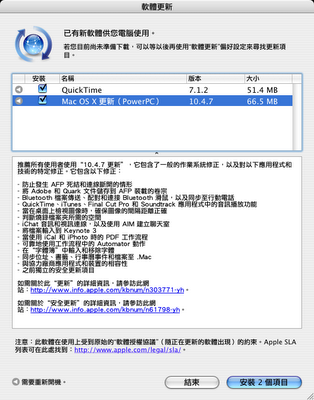
推薦所有使用者使用“10.4.7 更新”,它包含了一般的作業系統修正,以及對以下應用程式和技術的特定修正。它包含以下修正:

- 防止發生 AFP 死結和連線斷開的情形
- 將 Adobe 和 Quark 文件儲存到 AFP 裝載的卷宗
- Bluetooth 檔案傳送、配對和連接 Bluetooth 滑鼠,以及同步至行動電話
- QuickTime、iTunes、Final Cut Pro 和 Soundtrack 應用程式中的音訊播放功能
- 當在桌面上檢視圖像時,確保圖像的間隔距離正確
- 判斷燒錄檔案夾所需的空間
- iChat 音訊和視訊連線,以及使用 AIM 建立聊天室
- 將檔案輸入到 Keynote 3
- 當使用 iCal 和 iPhoto 時的 PDF 工作流程
- 可靠地使用工作流程中的 Automator 動作
- 在“字體簿”中輸入和移除字體
- 同步位址、書籤、行事曆事件和檔案至 .Mac
- 與協力廠商應用程式和裝置的相容性
- 之前獨立的安全更新項目

如需關於此“更新”的詳細資訊,請參訪此網站:http://www.info.apple.com/kbnum/n303771-yh

如需關於“安全更新”的詳細資訊,請參訪此網站:http://www.info.apple.com/kbnum/n61798-yh


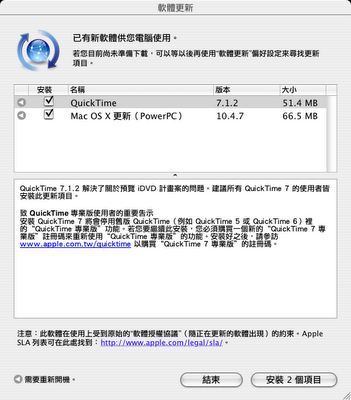
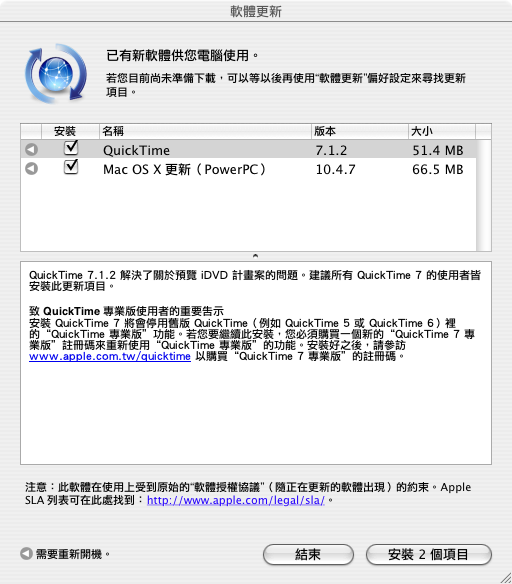
【QuickTime 7.1.2】

QuickTime 7.1.2 addresses an issue previewing iDVD projects. This update is recommended for all QuickTime 7 users.

QuickTime 7.1.2 解決了關於預覽iDVD計畫案的問題。建議所有 QuickTime 7 的使用者皆安裝此更新項目

http://www.apple.com/support/downloads/quicktime712.html

星期三, 6月 21, 2006

【Mac】iPhoto 6.0.4 & Aperture 1.1.2


Apple 在今天稍早貼出了 iLife '06 套件之一 iPhoto 6 的軟體更新。根據蘋果所附上的說明文件,這個軟體更新主要新增加了多款的圖片賀卡與明信片的樣板,另外也根據季節增添了夏季風格之派對請帖與謝卡設計,讓美國地區的使用者在利用 iPhoto 來訂製卡片時可以有更多的選擇。

需要更新的美國地區網友目前可以透過系統的軟體更新功能下載升級套件使用。

About iPhoto 6
iPhoto has always been the best way to easily import photos from your digital camera, organize them for fast retrieval, and then share them with family and friends. Now you get even more with iPhoto 6.

Learn more about iPhoto.

For a complete list of new features and improvements in iPhoto 6, go to www.apple.com/iphoto, or look in iPhoto Help, available in the Help menu when iPhoto is open.

Note:
1. iPhoto print services are available in the U.S., Canada, Japan, and select European countries; Requires Internet access; Fees and terms apply.
2. .Mac account required for iPhoto Photocast publishing.
3. Mac OS X version 10.4.4 required for iPhoto Photocasts.

For optimum performance, update your system software to the latest version of Mac OS X.
To make sure you have the latest version, choose Apple (?) > System Preferences and click Software Update.
Click Update Now to retrieve updates for your system.
After you install an update, it?s a good idea to click Update Now again to make sure you?ve received all the updates that are available.
You must have a connection to the Internet to use Software Update.

For a list of printers and digital cameras that work with iPhoto, see the iPhoto website at www.apple.com/iphoto.

Installing iPhoto 6

Before installing, it is recommended that you make a backup copy of your iPhoto library folder, which is located in your Pictures folder.

If you receive a message that you do not have sufficient privileges to install this software, click the lock icon in the installer and enter an administrator user name and password.
The administrator name is shown in the Users pane of System Preferences.
For more information, see Mac Help, available in the Help menu.

Finding answers and instructions

-Application-specific Help: For detailed instructions on using iPhoto, open the onscreen help (available in the Help menu when iPhoto is open).

-Product Information: For general product information and updates, visit the iPhoto website at www.apple.com/iphoto.

檔案下載

Aperture 1.1.2


Designed from the ground up for professional photographers, Aperture provides everything you need for after the shoot, delivering the first all-in-one post-production tool for photographers.

Learn more about Aperture

What’s New in this Version
- Addresses issues related to overall reliability and performance.

星期五, 6月 16, 2006

【Mac】Bluetooth Firmware Update 1.2.1 (PPC)

About This Update
The Bluetooth Firmware Update 1.2.1 improves Bluetooth performance and reliability issues.

When the update package is downloaded, the Bluetooth Firmware Updater application will be launched. Follow the on screen directions to update your Bluetooth Firmware.

Please note that if you were successful in installing Bluetooth Firmware Update version 1.2. This update is not needed.

蘋果於稍早發佈了 PowerPC Mac 平台的 Bluetooth Firmware Update 1.2.1,改進了藍芽的執行效能和修正一些安全問題。此項更新程式會在下載完成後自動開啟,只需依照螢幕上的指示,即可順利完成更新。不過蘋果的支援網頁也提醒:若是先前已經更新至 Bluetooth Firmware 1.2 版,則可以不用安裝此 1.2.1 版更新,網友們可直接點選連結前往下載此項更新。

下載位置

【Mac】Microsoft Office 2004 for Mac 11.2.4 Update


This update fixes vulnerabilities in Office 2004 for Mac that an attacker can use to overwrite the contents of your computer's memory with malicious code. This update also fixes issues in Microsoft PowerPoint 2004 and Entourage 2004, and it includes all of the improvements released in all previous Office 2004 updates.

據微軟表示,此次的更新 "修正了 Office 2004 for Mac 被使用惡意程式碼改寫記憶體內容的問題,也修正了 PowerPoint 2004、Entourage 2004 的一些問題,並包含之前所有 Office 2004 的更新內容"。使用者可直接使用安裝 Office 2004 for Mac 時所提供的 Microsoft AutoUpdate 更新程式來自動安裝此項目。

老地方冰果室

星期三, 5月 31, 2006

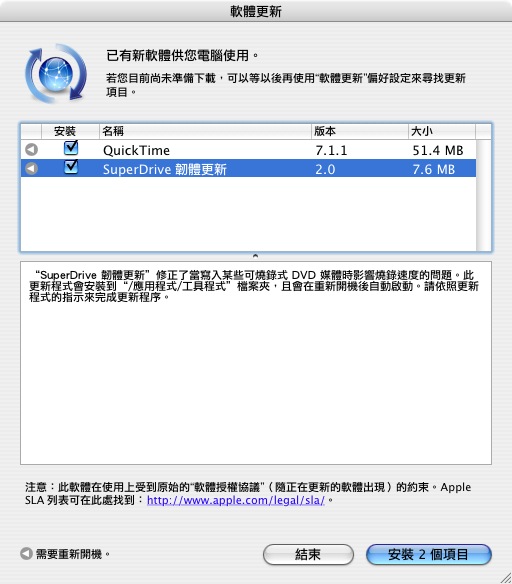
【Mac】SuperDrive Firmware Update v2.0


The SuperDrive Firmware Update fixes burning speeds when writing to certain recordable DVD media.

You can print these instructions and refer to them while you are updating the firmware.

System Requirements

- Mac OS X v10.3.9 Panther or Mac OS X v10.4.6 Tiger
- DVD Drive UJ-835
- One of the following products:
PowerBook G4 (12 -inch 1.5GHz)
PowerBook G4 (15-inch 1.33GHz, 1.5GHz, or 1.67GHz)
PowerBook G4 (17-inch 1.67GHz)
iMac G5 (17-inch 1.6GHz or 1.8GHz)
iMac G5 (20-inch 1.8GHz)
Mac mini G4

If you have a DVD drive UJ-845 this update will not apply and you will get the message "No devices were found that require this firmware update."

Installing the SuperDrive Firmware Update

Follow these steps to install the update:
1. Save all open documents and quit all applications.
2. Double-click the SuperDrive Firmware Update icon.

If you meet the system requirements and cannot update the firmware using this program, contact your local Apple Authorized Service Provider or an Apple Store retail location.

Important: Do not reset, shut down, or turn off power to your computer while updating the firmware. Doing so may damage your SuperDrive.

File Size: 7.3MB

星期五, 5月 26, 2006

【Mac】iWeb 1.1.1


iWeb is the easiest way to share your photos, movies, audio and playlists* on the Internet via stunning web pages, online photo albums, blogs, and podcasts. Apple-designed templates let you create beautiful websites in minutes, and the iLife Media Browser makes adding your media as simple as drag and drop. You can even select items from within the other iLife applications and send it directly to iWeb. With a single click, iWeb encodes your pages, updates your RSS feeds, adds any required passwords, announces your site to friends and family, and publishes everything directly to .Mac.

Learn more about iweb


What’s New in this Version
iWeb 1.1.1 refines comment and search support for blogs and podcasts published to .Mac. It also resolves a some issues related to publishing sites to .Mac.

iWeb 1.1.1 Updater will update your iWeb version 1.0, 1.0.1, or 1.1 if it is in your Applications folder and you have not changed its name. You need an administrator password to install this software. The administrator name is shown in the Accounts or Users pane of System Preferences. For more information, see Mac Help, available in the Help menu. For more information on how to use iWeb, see iWeb Help, available in the Help menu when the application is open, or go to www.apple.com/support/iweb.

Finding answers and instructions
iWeb Help:
Open the iWeb help that is available when the application is open for onscreen Help, printable documents to get you started, and a set of online multimedia tutorials (online tutorials are also available at www.apple.com/ilife/tutorials/iweb).

Apple Online Support and Updates:
If you have a question that is not addressed in iWeb onscreen help or tutorials, open iWeb Support that is available in the Help menu when the application is open and you are connected to the Internet (or go to www.apple.com/support/iweb).

Product Information:
For general product information, go to www.apple.com/ilife/iweb.

* A note about copyright
This software may be used to reproduce materials. It is licensed to you only for reproduction of non-copyrighted materials, materials in which you own the copyright, or materials you are authorized or legally permitted to reproduce. If you are uncertain about your right to copy any material, contact your legal advisor.

File Size: 88.8MB