精選文章

[配件] MOFT Snap iPad保護殼+平板支架

平常我帶 iPad 出門會用兩種不同保護殼做替換 UAG Metropolis for iPad Pro 11" 一個是 UAG 的 Metropolis 保護殼,幾乎全都包,但缺點就是角度比較少,也有點厚重,但保護性相當不錯。 MOFT Float for iPad ...

星期一, 5月 15, 2006

【Mac】iMovie HD 6.0.2 & iDVD 6.0.2

【iMovie HD 6.0.2】


With an abundance of powerful new features and possibilities, iMovie HD 6 continues to be the fastest and easiest way to turn a home video into your own Hollywood-style hit that you can share with family and friends via iDVD, email, your iPod or other compatible mobile device. And iMovie HD 6 is the easiest way to create a video podcast, which you can share with the world via the Internet with iWeb and .Mac.

Learn more about iMovie

What’s New in this Version
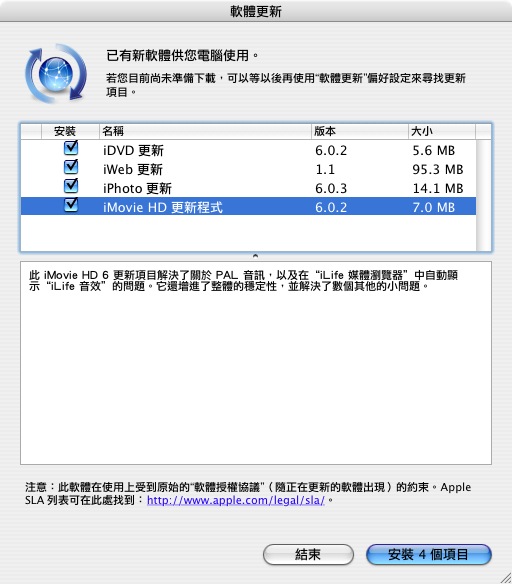
This update to iMovie HD 6 addresses issues with Ken Burns rendering performance, scrubber bar editing performance, theme image quality, PAL audio, and displaying iLife Sound Effects automatically in its iLife Media Browser. It also improves overall stability and addresses a number of other minor issues.
Additional requirements:
High definition video (HDV) requires a minimum of a 1GHz G4 or faster processor and 512MB of RAM
Mac OS X v10.4.4 is required for iMovie motion themes and real-time effects A .Mac account is recommended for iWeb; fees and terms apply

For the latest news and information about iMovie HD, go to the iMovie HD website at www.apple.com/ilife/imovie.

Additional requirements:
-To install iMovie HD 6.0.2, you need:
Macintosh computer with a PowerPC G4, PowerPC G5, or Intel Core processor (512 MB of RAM required for HDV support)
256MB of RAM; 512MB recommended
Mac OS X v10.3.9 or v10.4.3 or later; Mac OS X v10.4.4 recommended
QuickTime v7.0.4 or later (v7.0.4 included with iLife 06)


For optimum performance, update your system software to the latest version of Mac OS X and QuickTime.
To make sure you have the latest versions, choose Apple> System Preferences and click Software Update. Click Check Now or Update Now to retrieve updates for your system. After you install an update, it is a good idea to click Check Now or Update Now again to make sure you have received all the updates that are available. You must have a connection to the Internet to use Software Update.

Installing iMovie HD 6.0.2 Updater

iMovie HD 6.0.2 Updater will update your iMovie HD version 6.0 or 6.0.1 if it is in your Applications folder and you have not changed its name. You need an administrator password to install this software. The administrator name is shown in the Accounts or Users pane of System Preferences. For more information, see Mac Help, available in the Help menu. .

For more information on how to use iMovie HD, see iMovie HD Help, available in the Help menu when the application is open, or go to www.apple.com/support/imovie.

Finding answers and instructions

iMovie HD Help:
Open the iMovie help that is available when the application is open for onscreen Help, printable documents to get you started, and a set of online multimedia tutorials (online tutorials are also available at www.apple.com/ilife/tutorials/imovie.

Apple Online Support and Updates:
If you have a question that is not addressed in iMovie HD onscreen help or tutorials, open iMovie HD Support that is available in the Help menu when the application is open and you are connected to the Internet (or go to www.apple.com/support/imovie).

Product Information:
For general product information and updates, go to www.apple.com/ilife/imovie.

Combo 54.6MB
Update 7MB


【iDVD 6.0.2】


iDVD continues its tradition as the best and easiest way to make Hollywood-style DVDs. Simply take your movies,photos, and music and burn a DVD that play on virtually any DVD player to share with family and friends. iDVD provides a host of new features, including creating widescreen DVDs, having more creative control, even letting Magic iDVD help you create a DVD project automatically, and new themes. And now iDVD allows you to use either a SuperDrive or compatible third-party DVD burner.

Learn more about iDVD

This update to iDVD 6 resolves issues with integration with the other iLife applications, importing of legacy projects and some theme related issues. It also addresses a number of other minor issues.

For more information on iDVD, see the web page at http://www.apple.com/ilife/idvd

Update 5MB

Technorati Tags:

星期四, 5月 11, 2006

【Mac】Quicktime 7.1, Security Update 2006-003, FrontRow 1.2.2

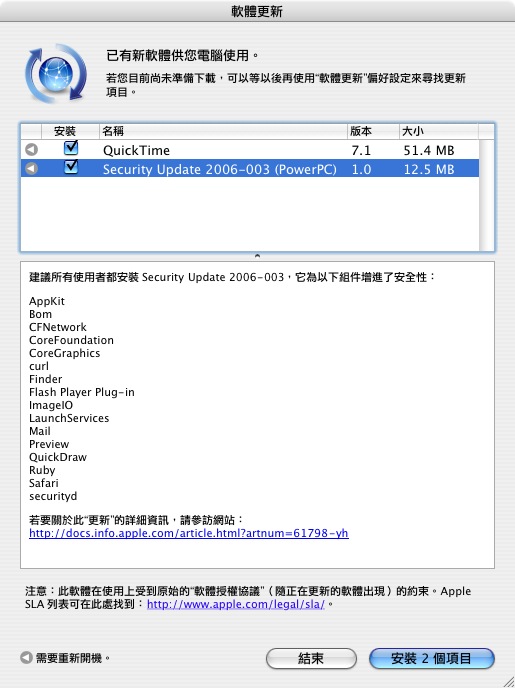
QuickTime 7.1

QuickTime 7.1 is an important release that delivers numerous bug fixes, support for iLife ’06, and H.264 performance improvements. This update is highly recommended for all QuickTime 7 users.
新版本 提供了數個重要的錯誤修正,並解決了嚴重的安全性問題。強烈建議所有的 QuickTime 7 使用者進行更新。
相關位置

Security Update 2006-003

建議所有使用者都安裝 Security Update 2006-003,它為以下組件增進了安全性:
AppKit , Bom , CFNetwor , CoreFoundation , CoreGraphics , curl , Finder , Flash Player Plug-in , ImageIO , LaunchServices , Mail , Preview , QuickDraw , Ruby , Safari , securityd
相關位置

Front Row 1.2.2

Bugs fixed in 1.2.2 include:
- Addresses bugs that prevented song shuffling within playlists
- Front row no longer says the server was not found when its waiting for a large movie trailer or long shared video to load
- Corrects bugs that prevented authorized Audible Audiobooks from playing
- Fixes a variety of DVD compatibility issues
- Purchased movies located in the Movies folder are now correctly recognized
- Includes a variety of fixes for VoiceOver accessibility
- Fixes a bug that prevented Front Row from reconnecting to shared video libraries after wake from sleep
FrontRow 1.2.2 則是改進了播放 iTunes 音樂列表、連線觀看預告片時找不到伺服器、DVD 播放相容性、語音控制等問題,新版 FrontRow 也新增了全螢幕播放的功能。使用者可直接使用軟體更新來安裝這些項目,或是至蘋果官方的支援網頁下載更新檔案自行安裝。
相關位置
想在任何Mac上執行FrontRow,參考這個網站吧

星期四, 5月 04, 2006

關島之旅......恭喜我考過了


這次懷著忐忑的心去應試,過了三個多禮拜,終於得到了好消息
爸、我沒讓你失望了

星期一, 4月 24, 2006

【Mac】GarageBand 3.0.2 Update

About this update
The best way to create music on a Mac is now the best way to create podcasts, too. The podcast recording studio in GarageBand 3 puts you in the control room of your own full-featured radio station. Get your voice on the Internet in just a few minutes.

Learn more about GarageBand.

What’s New in this Version
- GarageBand 3.0.2 addresses issues with video handling, podcast exporting, and importing QuickTime markers. It also addresses a number of other minor issues.

主要解決影片處理、podcast 輸出、QuickTime 標記輸入等問題。更新程式適用於 PowerPC 與 Intel 的 Mac。

星期四, 4月 20, 2006

出清拍賣大血拼@豐澤

沒想到在台北逛豐澤,居然可以買到一堆便宜的打折品,真不賴唷!


星期二, 4月 04, 2006

【Mac】Mac OS X 10.4.6


Mac OS X 10.4.6 更新

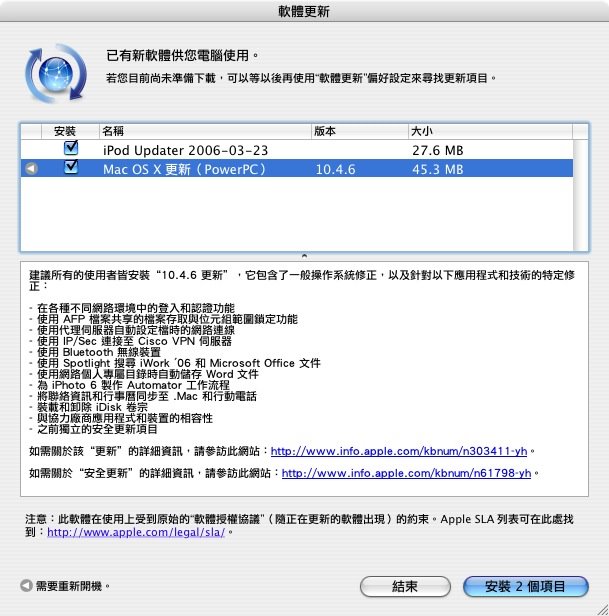
建議所有的使用者皆安裝“10.4.6 更新”,它包含了一般操作系統修正,以及針對以下應用程式和技術的特定修正:

- 在各種不同網路環境中的登入和認證功能
- 使用 AFP 檔案共享的檔案存取與位元組範圍鎖定功能
- 使用代理伺服器自動設定檔時的網路連線
- 使用 IP/Sec 連接至 Cisco VPN 伺服器
- 使用 Bluetooth 無線裝置
- 使用 Spotlight 搜尋 iWork '06 和 Microsoft Office 文件
- 使用網路個人專屬目錄時自動儲存 Word 文件
- 為 iPhoto 6 製作 Automator 工作流程
- 將聯絡資訊和行事曆同步至 .Mac 和行動電話
- 裝載和卸除 iDisk 卷宗
- 與協力廠商應用程式和裝置的相容性
- 之前獨立的安全更新項目

如需關於該“更新”的詳細資訊,請參訪此網站:http://www.info.apple.com/kbnum/n303411-yh。

如需關於“安全更新”的詳細資訊,請參訪此網站:http://www.info.apple.com/kbnum/n61798-yh。

The 10.4.6 Update is recommended for all users and includes general operating system fixes, as well as specific fixes for the following applications and technologies:

- login and authentication in a variety of network environments
- file access and byte range locking with AFP file sharing
- network access when using proxy server automatic configuration files
- connecting to Cisco VPN servers using IP/Sec
- using Bluetooth wireless devices
- searching iWork and Microsoft Office documents with Spotlight
- saving Word documents automatically when using a network home directory
- creating Automator workflows for iPhoto 6
- synchronizing contacts and calendars to .Mac and mobile phones
- mounting and unmounting iDisk volumes
- compatibility with third party applications and devices
- previous standalone security updates

For detailed information on this Update, please visit this website: http: http://www.info.apple.com/kbnum/n303410

Mac OS X 10.4.6 Combo for PPC

Mac OS X 10.4.6 Combo for Intel

Mac OS X 10.4.6 for PPC

Mac OS X 10.4.6 for Intel

星期二, 3月 14, 2006

【Mac】Security Update 2006-002 v1.1


系統安全更新 2006-002 v1.1,修正了在這禮拜所發佈的 2006-002 中所發現,在軟體更新後某些用戶遭遇 Safari 執行程式資料毀損的問題。跟上次一樣,這次更新也包含了 apache_mod_php、CoreTypes、LaunchServices、Mail、rsync,以及 Safari 等套件內容。而 v1.1 同樣包含了之前所推出的 2006-001 中所有套件內容。

About this update

Security Update 2006-002 is recommended for all users and improves the reliability and security of the following components:
apache_mod_php
CoreTypes
LaunchServices
Mail
rsync
Safari

Additionally, this update incorporates Security Update 2006-001, which improves the security of the following components:

apache_mod_php
automount
Bom
Directory Services
iChat
IPSec
LaunchServices
LibSystem
loginwindow
Mail
rsync
Safari
Syndication

下載位置(PPC)
相關資料(PPC)

下載位置(PPC)
相關資料(Intel)