About this update
The best way to create music on a Mac is now the best way to create podcasts, too. The podcast recording studio in GarageBand 3 puts you in the control room of your own full-featured radio station. Get your voice on the Internet in just a few minutes.
Learn more about GarageBand.
What’s New in this Version
- GarageBand 3.0.2 addresses issues with video handling, podcast exporting, and importing QuickTime markers. It also addresses a number of other minor issues.
主要解決影片處理、podcast 輸出、QuickTime 標記輸入等問題。更新程式適用於 PowerPC 與 Intel 的 Mac。
精選文章
[配件] MOFT Snap iPad保護殼+平板支架
平常我帶 iPad 出門會用兩種不同保護殼做替換 UAG Metropolis for iPad Pro 11" 一個是 UAG 的 Metropolis 保護殼,幾乎全都包,但缺點就是角度比較少,也有點厚重,但保護性相當不錯。 MOFT Float for iPad ...

星期一, 4月 24, 2006


星期四, 4月 20, 2006
星期二, 4月 04, 2006
【Mac】Mac OS X 10.4.6
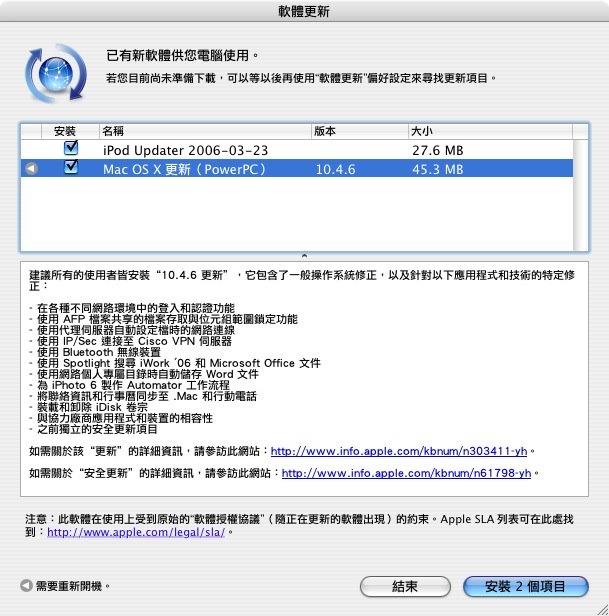
Mac OS X 10.4.6 更新
建議所有的使用者皆安裝“10.4.6 更新”,它包含了一般操作系統修正,以及針對以下應用程式和技術的特定修正:
- 在各種不同網路環境中的登入和認證功能
- 使用 AFP 檔案共享的檔案存取與位元組範圍鎖定功能
- 使用代理伺服器自動設定檔時的網路連線
- 使用 IP/Sec 連接至 Cisco VPN 伺服器
- 使用 Bluetooth 無線裝置
- 使用 Spotlight 搜尋 iWork '06 和 Microsoft Office 文件
- 使用網路個人專屬目錄時自動儲存 Word 文件
- 為 iPhoto 6 製作 Automator 工作流程
- 將聯絡資訊和行事曆同步至 .Mac 和行動電話
- 裝載和卸除 iDisk 卷宗
- 與協力廠商應用程式和裝置的相容性
- 之前獨立的安全更新項目
如需關於該“更新”的詳細資訊,請參訪此網站:http://www.info.apple.com/kbnum/n303411-yh。
如需關於“安全更新”的詳細資訊,請參訪此網站:http://www.info.apple.com/kbnum/n61798-yh。
The 10.4.6 Update is recommended for all users and includes general operating system fixes, as well as specific fixes for the following applications and technologies:
- login and authentication in a variety of network environments
- file access and byte range locking with AFP file sharing
- network access when using proxy server automatic configuration files
- connecting to Cisco VPN servers using IP/Sec
- using Bluetooth wireless devices
- searching iWork and Microsoft Office documents with Spotlight
- saving Word documents automatically when using a network home directory
- creating Automator workflows for iPhoto 6
- synchronizing contacts and calendars to .Mac and mobile phones
- mounting and unmounting iDisk volumes
- compatibility with third party applications and devices
- previous standalone security updates
For detailed information on this Update, please visit this website: http: http://www.info.apple.com/kbnum/n303410
Mac OS X 10.4.6 Combo for PPC
Mac OS X 10.4.6 Combo for Intel
Mac OS X 10.4.6 for PPC
Mac OS X 10.4.6 for Intel
星期二, 3月 14, 2006
【Mac】Security Update 2006-002 v1.1

系統安全更新 2006-002 v1.1,修正了在這禮拜所發佈的 2006-002 中所發現,在軟體更新後某些用戶遭遇 Safari 執行程式資料毀損的問題。跟上次一樣,這次更新也包含了 apache_mod_php、CoreTypes、LaunchServices、Mail、rsync,以及 Safari 等套件內容。而 v1.1 同樣包含了之前所推出的 2006-001 中所有套件內容。
About this update
Security Update 2006-002 is recommended for all users and improves the reliability and security of the following components:
apache_mod_php
CoreTypes
LaunchServices
rsync
Safari
Additionally, this update incorporates Security Update 2006-001, which improves the security of the following components:
apache_mod_php
automount
Bom
Directory Services
iChat
IPSec
LaunchServices
LibSystem
loginwindow
rsync
Safari
Syndication
下載位置(PPC)
相關資料(PPC)
下載位置(PPC)
相關資料(Intel)
星期三, 3月 08, 2006
30分鐘 即可破解Mac OS X? Mac安全嗎?
最近Mac的網路安全的問題一直浮現,使用者對Mac OS X的作業系統安全也感到存疑,是否這樣的不安全呢?我們來看看兩篇報導,再來做評論。
07/03/2006
30分鐘 即可破解Mac OS X?
上個月OS X駭客比賽的勝利者表示,取得麥金塔電腦(Mac)的root存取權限,是輕而易舉的事。
一名瑞典籍麥金塔電腦玩家2月22日用自己的Mac Mini充當伺服器,廣邀駭客破解這台電腦的安全防護,看誰先取得root存取權限。取得root存取權限,可讓駭客接管整台電腦,刪除檔案和資料夾,或安裝應用程式。
結果,短短數小時之內,比賽就宣告結束。挑戰者接著在他的網站上張貼下列訊息:「這太爛了。六小時之後,這台可憐的小麥金塔就被佔領,這個網頁也遭塗鴉。」
贏得比賽的駭客要求匿名,只許ZDNet Australia以「Gwerdna」代號稱呼他。他說,不消半個鐘頭,他就取得那台麥金塔電腦的root控制權。
Gwerdna告訴ZDNet Australia「也許花了20或30分,就拿下那台機器的root權限。我先搜尋那台電腦,看有沒有某些設定不當之處,和其他明顯的安全漏洞,但後來我決定利用一些尚未發表的攻擊程式(exploit)--其中不乏專門用來鑽Mac OS X漏洞的程式。」
他說,被他侵入的麥金塔電腦在防護方面有待加強,但即使再加強,也沒辦法阻擋他,因為他鑽的安全漏洞還未公諸於世,蘋果電腦公司也未提供修補程式。
Gwerdna說:「這台Mac的設定方式類似把Mac當作伺服器,同時為使用者執行眾多的遠端服務和本機服務......現在已有各種不同的Mac OS X強化指南,可用來強化機器的防護,但仍無法補強那個被我利用來取得存取權限的弱點。如果弱點沒人知道,沒人公布,你能做的實在有限。一種方法是使用額外的強化補帖,舉例說,就Linux而言就是PaX和Grsecurity修補程式,在系統上提供許多選項,並使用非執行記憶(nonexecutable memory),以防記憶毀損引發的駭客入侵。」
他的結論是,OS X內含易於侵入的安全漏洞,可讓駭客侵入蘋果的作業系統。
「Mac OS X的弱點很容易就找得到。不過,因為市場占有率不大,所以吸引不了真正要找碴者的興趣,」Gwerdna說。
數周來,蘋果的OS X挨轟,先後出現兩種病毒,以及許多重大安全漏洞。蘋果電腦公司事後已亡羊補牢。
資料來源
08/03/2006
不服輸 工程師再度挑戰OS X駭客
美國威斯康辛大學系統工程師Dave Schroeder再次邀請全球駭客挑戰他的Mac電腦,他表示稍早前的初賽太過容易。
Schroeder邀請駭客闖進他使用Mac OS X 10.4.5最新安全更新版的Mac Mini電腦,更改當中的首頁。他在個人網站上表示,該系統有兩個區域帳號,和SHH及HTTP入口 – 遠多於大多數的Mac OS X系統。Secure Shell,簡稱SSH,是網路電腦安全登入與執行命令的協定;HTTP(超文件傳輸協定)則是網路上普遍使用的資訊傳輸協定。
這場線上挑戰原訂10日結束,但由於反應熱烈,截止時間提前到美西時間7日晚間10點。Schroeder在電話訪問中表示:「這台小Mac Mini能支撐這麼久真是驚人,它遭受了猛烈的攻擊。(這場比賽)得到爆炸性的迴響,這不是一場真正、官方的測試:純粹是為了學術興趣。」
稍早的挑戰中,一位匿名駭客宣稱在30分鐘內,就利用一個未曝光的弱點攻入OS X。不過,第一次挑戰時,攻擊者已經有使用者存取權限,而非將駭客完全擋在門外。Schroeder在電郵回函中寫道:「原始的挑戰是任何擁有區域帳號的人,都能透過SHH進入系統。這是個重要的區別,因為如果你對一台電腦有區域 – 或實體的 – 帳號,你在提高本身權限的能力上,就佔有明顯的優勢。」
媒體稍早的報導均未提及駭客其實有本地存取權限,使得Schroeder再次提出挑戰。他說:「原始的報導讓讀者誤以為Mac OS X只要連上網路就很容易被駭。」
但之前的挑戰仍不容輕忽。Schroeder表示:「假設這是真的,它顯示出一個尚未知的區域權限升級,足以讓任何區域使用者得到根部層級的存取。」,這對於任何公用的連線機器,如學校電腦,將是嚴重的問題。
SANS Institute首席研究員Johannes Ullrich指出,對於使用蘋果電腦作業系統的網路代管商而言,這也是一大問題。共用一台機器的顧客都需要存取權限以更新他們的網站,一個權限升級的瑕疵,就能讓惡意使用者得到完全控制系統的入口。
在此之前,安全業者接連發現兩隻針對OS X的蠕蟲,和一個被列為「極度危急」的安全弱點。蘋果最新釋出的補救程式,也遭安全專家質疑其效果不彰。Schroeder準備詳細檢查Mac的記錄檔,公佈任何有趣的地方。他說:「我知道提前結束會讓很多人失望。」
7日稍早,Schroeder表示大部分的駭客採用尋常的網路攻擊指令和工具、SSH攻擊、接口掃瞄和Nessus等安全工具掃瞄。7日上午,該站曾因阻絕服務攻擊而短暫關閉。
Schroeder請成功駭入其電腦的人,用電郵向他說明詳細的攻擊程序,他將提報給適當的軟體商,並在挑戰結束後公佈結果。
資料來源
看完這兩篇報導之後,可見得有些消息不能只看一面,要多方面去收集資料來驗證,才會比較有公正的答案,尤其現在網路的快速竄起,很多消息並不見得是絕對正確的,這也讓我們瞭解到不論哪一種作業系統,只要是人做出來的,都是會有瑕疵的,沒有東西是完美的,在使用電腦還是要注意自己的資料安全,勿下載來路不明的檔案以及不明的網址,確保個人資料遭竊取與侵入,尤其使用windows的人更要注意唷,但Mac一族也要有所警惕才是。
相關資料:
【ZDNet】Mac OS X hacked under 30 minutes
【老地方冰果室】抗議媒體標題殺人 美大學網管挑戰駭客
rm my Mac
Mobile01相關討論
Wikipedia:Comparison of OS
07/03/2006
30分鐘 即可破解Mac OS X?
上個月OS X駭客比賽的勝利者表示,取得麥金塔電腦(Mac)的root存取權限,是輕而易舉的事。
一名瑞典籍麥金塔電腦玩家2月22日用自己的Mac Mini充當伺服器,廣邀駭客破解這台電腦的安全防護,看誰先取得root存取權限。取得root存取權限,可讓駭客接管整台電腦,刪除檔案和資料夾,或安裝應用程式。
結果,短短數小時之內,比賽就宣告結束。挑戰者接著在他的網站上張貼下列訊息:「這太爛了。六小時之後,這台可憐的小麥金塔就被佔領,這個網頁也遭塗鴉。」
贏得比賽的駭客要求匿名,只許ZDNet Australia以「Gwerdna」代號稱呼他。他說,不消半個鐘頭,他就取得那台麥金塔電腦的root控制權。
Gwerdna告訴ZDNet Australia「也許花了20或30分,就拿下那台機器的root權限。我先搜尋那台電腦,看有沒有某些設定不當之處,和其他明顯的安全漏洞,但後來我決定利用一些尚未發表的攻擊程式(exploit)--其中不乏專門用來鑽Mac OS X漏洞的程式。」
他說,被他侵入的麥金塔電腦在防護方面有待加強,但即使再加強,也沒辦法阻擋他,因為他鑽的安全漏洞還未公諸於世,蘋果電腦公司也未提供修補程式。
Gwerdna說:「這台Mac的設定方式類似把Mac當作伺服器,同時為使用者執行眾多的遠端服務和本機服務......現在已有各種不同的Mac OS X強化指南,可用來強化機器的防護,但仍無法補強那個被我利用來取得存取權限的弱點。如果弱點沒人知道,沒人公布,你能做的實在有限。一種方法是使用額外的強化補帖,舉例說,就Linux而言就是PaX和Grsecurity修補程式,在系統上提供許多選項,並使用非執行記憶(nonexecutable memory),以防記憶毀損引發的駭客入侵。」
他的結論是,OS X內含易於侵入的安全漏洞,可讓駭客侵入蘋果的作業系統。
「Mac OS X的弱點很容易就找得到。不過,因為市場占有率不大,所以吸引不了真正要找碴者的興趣,」Gwerdna說。
數周來,蘋果的OS X挨轟,先後出現兩種病毒,以及許多重大安全漏洞。蘋果電腦公司事後已亡羊補牢。
資料來源
08/03/2006
不服輸 工程師再度挑戰OS X駭客
美國威斯康辛大學系統工程師Dave Schroeder再次邀請全球駭客挑戰他的Mac電腦,他表示稍早前的初賽太過容易。
Schroeder邀請駭客闖進他使用Mac OS X 10.4.5最新安全更新版的Mac Mini電腦,更改當中的首頁。他在個人網站上表示,該系統有兩個區域帳號,和SHH及HTTP入口 – 遠多於大多數的Mac OS X系統。Secure Shell,簡稱SSH,是網路電腦安全登入與執行命令的協定;HTTP(超文件傳輸協定)則是網路上普遍使用的資訊傳輸協定。
這場線上挑戰原訂10日結束,但由於反應熱烈,截止時間提前到美西時間7日晚間10點。Schroeder在電話訪問中表示:「這台小Mac Mini能支撐這麼久真是驚人,它遭受了猛烈的攻擊。(這場比賽)得到爆炸性的迴響,這不是一場真正、官方的測試:純粹是為了學術興趣。」
稍早的挑戰中,一位匿名駭客宣稱在30分鐘內,就利用一個未曝光的弱點攻入OS X。不過,第一次挑戰時,攻擊者已經有使用者存取權限,而非將駭客完全擋在門外。Schroeder在電郵回函中寫道:「原始的挑戰是任何擁有區域帳號的人,都能透過SHH進入系統。這是個重要的區別,因為如果你對一台電腦有區域 – 或實體的 – 帳號,你在提高本身權限的能力上,就佔有明顯的優勢。」
媒體稍早的報導均未提及駭客其實有本地存取權限,使得Schroeder再次提出挑戰。他說:「原始的報導讓讀者誤以為Mac OS X只要連上網路就很容易被駭。」
但之前的挑戰仍不容輕忽。Schroeder表示:「假設這是真的,它顯示出一個尚未知的區域權限升級,足以讓任何區域使用者得到根部層級的存取。」,這對於任何公用的連線機器,如學校電腦,將是嚴重的問題。
SANS Institute首席研究員Johannes Ullrich指出,對於使用蘋果電腦作業系統的網路代管商而言,這也是一大問題。共用一台機器的顧客都需要存取權限以更新他們的網站,一個權限升級的瑕疵,就能讓惡意使用者得到完全控制系統的入口。
在此之前,安全業者接連發現兩隻針對OS X的蠕蟲,和一個被列為「極度危急」的安全弱點。蘋果最新釋出的補救程式,也遭安全專家質疑其效果不彰。Schroeder準備詳細檢查Mac的記錄檔,公佈任何有趣的地方。他說:「我知道提前結束會讓很多人失望。」
7日稍早,Schroeder表示大部分的駭客採用尋常的網路攻擊指令和工具、SSH攻擊、接口掃瞄和Nessus等安全工具掃瞄。7日上午,該站曾因阻絕服務攻擊而短暫關閉。
Schroeder請成功駭入其電腦的人,用電郵向他說明詳細的攻擊程序,他將提報給適當的軟體商,並在挑戰結束後公佈結果。
資料來源
看完這兩篇報導之後,可見得有些消息不能只看一面,要多方面去收集資料來驗證,才會比較有公正的答案,尤其現在網路的快速竄起,很多消息並不見得是絕對正確的,這也讓我們瞭解到不論哪一種作業系統,只要是人做出來的,都是會有瑕疵的,沒有東西是完美的,在使用電腦還是要注意自己的資料安全,勿下載來路不明的檔案以及不明的網址,確保個人資料遭竊取與侵入,尤其使用windows的人更要注意唷,但Mac一族也要有所警惕才是。
相關資料:
【ZDNet】Mac OS X hacked under 30 minutes
【老地方冰果室】抗議媒體標題殺人 美大學網管挑戰駭客
rm my Mac
Mobile01相關討論
Wikipedia:Comparison of OS
星期三, 3月 01, 2006
【Mac】iTune 6.0.4、iPhoto 6.0.2、Security Update 2006-001、FrontRow 1.2.1、GarageBand 3.0.1
iTune 6.0.4

iTunes 6.0.3 includes stability and performance improvements over iTunes 6.0.2.
下載位置
相關資料
iPhoto 6.0.2
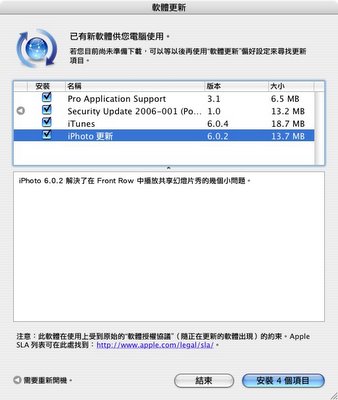
Resolves several minor issues with playing shared slideshows in Front Row.
下載位置
相關資料
Security 2006-001
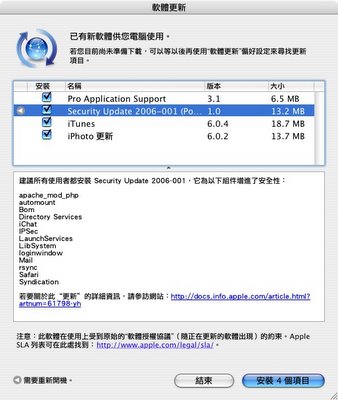
About Security Update 2006-001 Mac OS X 10.4.5 (PPC)
Security Update 2006-001 is recommended for all users and improves the security of the following components.
apache_mod_php
automount
Bom
Directory Services
iChat
IPSec
LaunchServices
LibSystem
loginwindow
OpenSSH
rsync
Safari
Syndication
下載位置(PPC)
下載位置(Intel)
相關資料
FrontRow 1.2.1
With Front Row, you can enjoy full-screen music, photos, videos, and DVDs on your Macintosh using a simple Apple remote control. This Front Row update improves compatibility with iTunes and iPhoto sharing.
This version of Front Row requires a Macintosh computer with:
-Built-in infrared (IR) receiver
-Mac OS X v10.4.5 or later
-iTunes 6.0.4 and iPhoto 6.0.2 or later
下載位置
相關資料
How to Instal FrontRow in Your Mac
GarageBand 3.0.1
GarageBand 3.0.1 addresses an issue with Podcast production using the French or Finnish localized versions.
下載位置
相關資料

iTunes 6.0.3 includes stability and performance improvements over iTunes 6.0.2.
下載位置
相關資料
iPhoto 6.0.2

Resolves several minor issues with playing shared slideshows in Front Row.
下載位置
相關資料
Security 2006-001

About Security Update 2006-001 Mac OS X 10.4.5 (PPC)
Security Update 2006-001 is recommended for all users and improves the security of the following components.
apache_mod_php
automount
Bom
Directory Services
iChat
IPSec
LaunchServices
LibSystem
loginwindow
OpenSSH
rsync
Safari
Syndication
下載位置(PPC)
下載位置(Intel)
相關資料
FrontRow 1.2.1
With Front Row, you can enjoy full-screen music, photos, videos, and DVDs on your Macintosh using a simple Apple remote control. This Front Row update improves compatibility with iTunes and iPhoto sharing.
This version of Front Row requires a Macintosh computer with:
-Built-in infrared (IR) receiver
-Mac OS X v10.4.5 or later
-iTunes 6.0.4 and iPhoto 6.0.2 or later
下載位置
相關資料
How to Instal FrontRow in Your Mac
GarageBand 3.0.1
GarageBand 3.0.1 addresses an issue with Podcast production using the French or Finnish localized versions.
下載位置
相關資料
星期二, 2月 28, 2006
【Mac】New Mac Mini & iPod Hi-Fi
這次在美國加州的蘋果電腦總部,Steve Jobs宣佈推出兩樣新產品,分別是 iPod Hi-Fi 與使用 Intel 處理器的 Mac mini
Intel inside Mac mini

Apple's new Mac mini is available in two configurations, one sporting a 1.5GHz Core Solo processor for $599 and one with a 1.67GHz Core Duo processor for $799. Both systems, which mimic the form-factor of their predecessors, include iLife '06, Front Row, and the Apple remote control.
Both configurations feature 2MB of L2 cache, a 667MHz frontside bus, 512MB of RAM, AirPort Extreme, and Bluetooth 2.0. The low-end model packs a 60GB hard drive and combo drive, while the high-end features an 80GB hard drive and SuperDrive. Graphics are powered by Intel's GMA950 processor with 64MB of memory, supporting resolutions up to 1920x1200 but delivering marginal gaming performance. The new Mac mini also packs four USB ports and now features optical minijack digital audio in and out.
配備了 Intel Core 處理器的 Mac mini ,包括了 1.5GHz Intel Core Solo 與 1.66GHz Core Duo 處理器兩種規格,皆擁有 2MB L2 快取記憶體、 667MHz 前端匯流排、 512MB 隨機記憶體(兩排 DIMMs 上 512MB 的 667MHz DDR2 SDRAM (PC2-5300),支援最高達 2GB)、各配有60GB、80GB的硬碟、 Intel GMA950 圖形處理器/64MB 記憶體、內建 AirPort Extreme 與藍芽 2.0 無線網路與傳輸、 10/100/1000 Gigabit 乙太網路、 Apple Remote 多媒體遙控器…等。
iPod Hi-Fi

he iPod Hi-Fi "delivers breathtaking acoustic performance and room-filling sound unlike any other speaker system designed for the iPod," Apple said in a press release. Apple CEO Steve Jobs called the Hi-Fi the reinvention of the home stereo, billing the system as the "first iPod accessory that adds true high-fidelity sound quality to the iPod." The iPod Hi-Fi features an all-in-one design that can be powered either from an international power outlet or by six D-cell batteries. An integrated dock connector, remote control, and standard auxiliary-in mini-jack round out the features. The iPod Hi-Fi is available now for US$349.
長相有些像一般 5.1 聲道的中置喇叭的 iPod Hi-Fi ,也可視為一種 iPod 專用的街用 BoomBox。其體積為 43.18 x 16.76 x 17.53 公分,重 6.6 公斤;可直接插電,或以一號電池 (D Cell) 來供電以便自由移動與擺放位置;頂端具備標準的 iPod dock 可直接安放 iPod ,在 Dock 前方有音量調整觸控按鈕;號稱具備優美動聽的播音表現,且適合室內播放的音域與寬廣反應頻率。
Apple iPod 真皮皮套

Also available now from Apple are three leather cases for the iPod nano, 30GB iPod, and 60GB iPod. The cases completely wrap your iPod in high-end hide that will set you back $99.
Steve Jobs 也在今天發表了由蘋果電腦所設計的 iPod 皮套,與一般常見的 iPod 保護套不同的,這個皮套並不具有顯示窗,所以使用者在需要調控 iPod 時必須把 iPod 自皮套中取出。Apple iPod 真皮套一共有三款,可供 iPod 30G、iPod 60G 以及 iPod nano 使用,每組的價格為美金 $99 元。今天所發表的各項產品均自即日起開始出貨。
相關資料:
Apple Taiwan
ThinkSecret
frostyplace
Intel Mac mini: What you need to know
Opening up the Intel Mac mini
engadget
Intel inside Mac mini

Apple's new Mac mini is available in two configurations, one sporting a 1.5GHz Core Solo processor for $599 and one with a 1.67GHz Core Duo processor for $799. Both systems, which mimic the form-factor of their predecessors, include iLife '06, Front Row, and the Apple remote control.
Both configurations feature 2MB of L2 cache, a 667MHz frontside bus, 512MB of RAM, AirPort Extreme, and Bluetooth 2.0. The low-end model packs a 60GB hard drive and combo drive, while the high-end features an 80GB hard drive and SuperDrive. Graphics are powered by Intel's GMA950 processor with 64MB of memory, supporting resolutions up to 1920x1200 but delivering marginal gaming performance. The new Mac mini also packs four USB ports and now features optical minijack digital audio in and out.
配備了 Intel Core 處理器的 Mac mini ,包括了 1.5GHz Intel Core Solo 與 1.66GHz Core Duo 處理器兩種規格,皆擁有 2MB L2 快取記憶體、 667MHz 前端匯流排、 512MB 隨機記憶體(兩排 DIMMs 上 512MB 的 667MHz DDR2 SDRAM (PC2-5300),支援最高達 2GB)、各配有60GB、80GB的硬碟、 Intel GMA950 圖形處理器/64MB 記憶體、內建 AirPort Extreme 與藍芽 2.0 無線網路與傳輸、 10/100/1000 Gigabit 乙太網路、 Apple Remote 多媒體遙控器…等。
iPod Hi-Fi

he iPod Hi-Fi "delivers breathtaking acoustic performance and room-filling sound unlike any other speaker system designed for the iPod," Apple said in a press release. Apple CEO Steve Jobs called the Hi-Fi the reinvention of the home stereo, billing the system as the "first iPod accessory that adds true high-fidelity sound quality to the iPod." The iPod Hi-Fi features an all-in-one design that can be powered either from an international power outlet or by six D-cell batteries. An integrated dock connector, remote control, and standard auxiliary-in mini-jack round out the features. The iPod Hi-Fi is available now for US$349.
長相有些像一般 5.1 聲道的中置喇叭的 iPod Hi-Fi ,也可視為一種 iPod 專用的街用 BoomBox。其體積為 43.18 x 16.76 x 17.53 公分,重 6.6 公斤;可直接插電,或以一號電池 (D Cell) 來供電以便自由移動與擺放位置;頂端具備標準的 iPod dock 可直接安放 iPod ,在 Dock 前方有音量調整觸控按鈕;號稱具備優美動聽的播音表現,且適合室內播放的音域與寬廣反應頻率。
Apple iPod 真皮皮套

Also available now from Apple are three leather cases for the iPod nano, 30GB iPod, and 60GB iPod. The cases completely wrap your iPod in high-end hide that will set you back $99.
Steve Jobs 也在今天發表了由蘋果電腦所設計的 iPod 皮套,與一般常見的 iPod 保護套不同的,這個皮套並不具有顯示窗,所以使用者在需要調控 iPod 時必須把 iPod 自皮套中取出。Apple iPod 真皮套一共有三款,可供 iPod 30G、iPod 60G 以及 iPod nano 使用,每組的價格為美金 $99 元。今天所發表的各項產品均自即日起開始出貨。
相關資料:
Apple Taiwan
ThinkSecret
frostyplace
Intel Mac mini: What you need to know
Opening up the Intel Mac mini
engadget
訂閱:
文章 (Atom)